izhunny:

maevecurrywrites:

TODAY’S FEATURED ROLE:

Tom Hiddleston as Loki in the Avengers, circa 2012.

ARTICLES/REVIEWS:

https://www.hollywoodreporter.com/heat-vision/avengers-star-tom-hiddleston-defends-super-hero-films-314615

http://collider.com/the-avengers-tom-hiddleston-interview/

http://www.nydailynews.com/entertainment/tv-movies/avengers-tom-hiddleston-good-evil-article-1.1070712

VIDEO/AUDIO:

It’s not loading cause mobile but imma hit reblog and wait to die when i get home. Thanks in advance for killing me @maevecurrywrites . It’s how it wanted to go. Loki’d to death.

izhunny:

lokiwholockfactory:

Lokiwholockfactory has been tagged as explicit.

(I always have been, anyway.)

In case they strike me down post-Dec 17, find me at @lowhostrikesback – It will be the new home of Lokiwholockfactory.

Tagging mutuals I remember at the moment (though spread the word) :

@izhunny @devikafernando @iamthebadwolf85 @madmediamaven @beaglebitch @the-haven-of-fiction @i-wanna-be-toms-body-pillow @angreav @lolawashere @jennphoenix @violetsaffron73 @pedeka @quoting-shakespeare-to-ducks et al

They won’t let me toggle explicit off so I’ll probably here but more than likely i will be shadowed (nobody will be able to see me or any of my posts) which is worse than being deleted imo.

I haven’t seen anything flagged in my archive and I’ve been combing through it every spare moment I have. (Clean up is a bitch (50k+ posts/10k+likes). I’m probably wasting my time. But…

I’m big on reblogs, low on original posts. I’m doing clean up more for others than my own sake. If I see something I’d tell the OP but i got nothing. No posts/reblogs marked sensitive/explicit. Not even the straight up could not but mistaken for anything but porn rb of which I have deleted several. 😉 No emails either.

If they delete me I will beg to get back my izhunny url and let them dump my content.

My further contact info is in my profile at AO3, same user name.

*sees lowhostrikesback and giggles* that is perfect!

*seriously considers izhunnystrikesback for herself*

do it! we’ll be twinsies!

(im backing up original the original lowho content on wordpress for posterity)

lokiwholockfactory:

Lokiwholockfactory has been tagged as explicit.

(I always have been, anyway.)

In case they strike me down post-Dec 17, find me at @lowhostrikesback (link) – It will be the new home of Lokiwholockfactory.

Tagging mutuals I remember at the moment (though spread the word) :

@izhunny @devikafernando @iamthebadwolf85 @madmediamaven @beaglebitch @the-haven-of-fiction @i-wanna-be-toms-body-pillow @angreav @lolawashere @jennphoenix @violetsaffron73 @pedeka @quoting-shakespeare-to-ducks et al

reblogging with link attached

Lokiwholockfactory has been tagged as explicit.

(I always have been, anyway.)

In case they strike me down post-Dec 17, find me at @lowhostrikesback (link) – It will be the new home of Lokiwholockfactory.

Tagging mutuals I remember at the moment (though spread the word) :

@izhunny @devikafernando @iamthebadwolf85 @madmediamaven @beaglebitch @the-haven-of-fiction @i-wanna-be-toms-body-pillow @angreav @lolawashere @jennphoenix @violetsaffron73 @pedeka @quoting-shakespeare-to-ducks et al

Backing up your Tumblr blog to WordPress

obsessedwithpretty79:

thehumming6ird:

quickguide:

In this tutorial we’ll teach you how to make a copy of your Tumblr blog onto WordPress.com to act as a backup, or maybe just to say ‘thank u, next’ to Verizon’s Tumblr.

The first two steps don’t need to be followed if you already use WordPress.com.

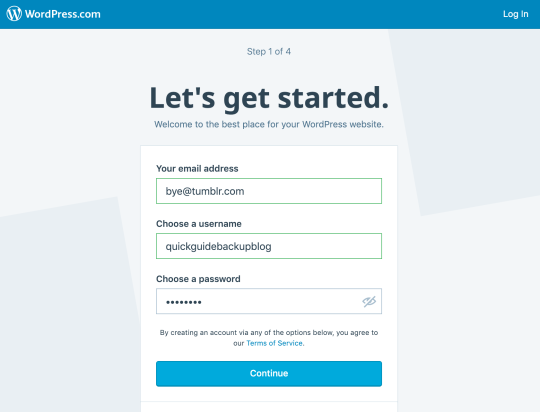
1. Sign up for a WordPress.com account

You need a WordPress.com blog, simply follow the steps to select your username and confirm your account via email.

Be sure to choose a free domain and free plan for now.

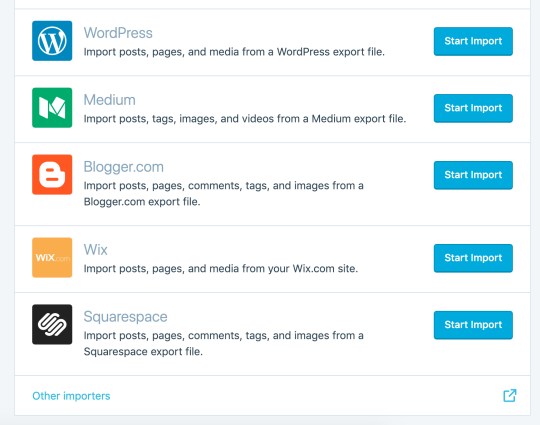
2. Open WordPress Admin

Click on Import

Click on Other importers.

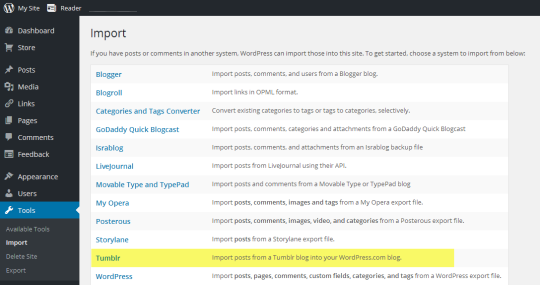
    3. Select import from Tumblr

    image

    4. Allow Tumblr access

    image

    Click the ‘Connect to Tumblr to begin’ button. You may need to log into Tumblr if you haven’t already. Be sure to allow access to WordPress.com

    5. Start the import!

    image

    Once authenticated you can select your Tumblr blog from the list of your blogs and click on ‘Import this blog’.

    And you’re done, WordPress.com takes care of the rest and will create a copy of your posts onto your WordPress.com blog.

    @obsessedwithpretty79 Also worth a look darling! Mine took almost a week to download so better start now 😉

    Thanks @thehumming6ird!! Will do this today!

    obsessedwithpretty79:

    thehumming6ird:

    coolfayebunny:

    bonesbuckleup:

    captainevans:

    some people’s blogs are being incorrectly flagged as explicit so if you would like to check your status, you can look it up on postlimit.com.

    if you have been incorrectly marked as nsfw, you can appeal before tumblr permanently filters you as such and your blog is set back to default settings prior to december 18th here.

    Everyone: this is how I found out I was flagged and marked explicit.  Check your stuff out and make sure you’re good to go.

    This is fantastic I didn’t know I’m pleased it’s ok! I’ve posted or rebloged over 20,000 posts in the 5 years plus I’ve been on here. Blimey!

    @obsessedwithpretty79 check out the appeal link above hun ❤

    @captaincorruptor Check this out and check to see if your blog has been flagged explicit in your settings… this is how I found out…

    Ive always been explicit. But as lokiwholockfactory is a sideblog, I can always start again. If they completely limit me post dec18, i will announce a new home for lowho and take this down.

    I’ll make an announcement soon when I have created a new blog replacement.